Advanced
⏱ 45 min read
© Gate of AI 2026-04-16
Master agentic orchestration using TypeScript and the latest OpenAI Agents SDK to automate high-reasoning software development workflows.
Watch Practical Tutorial
Prerequisites
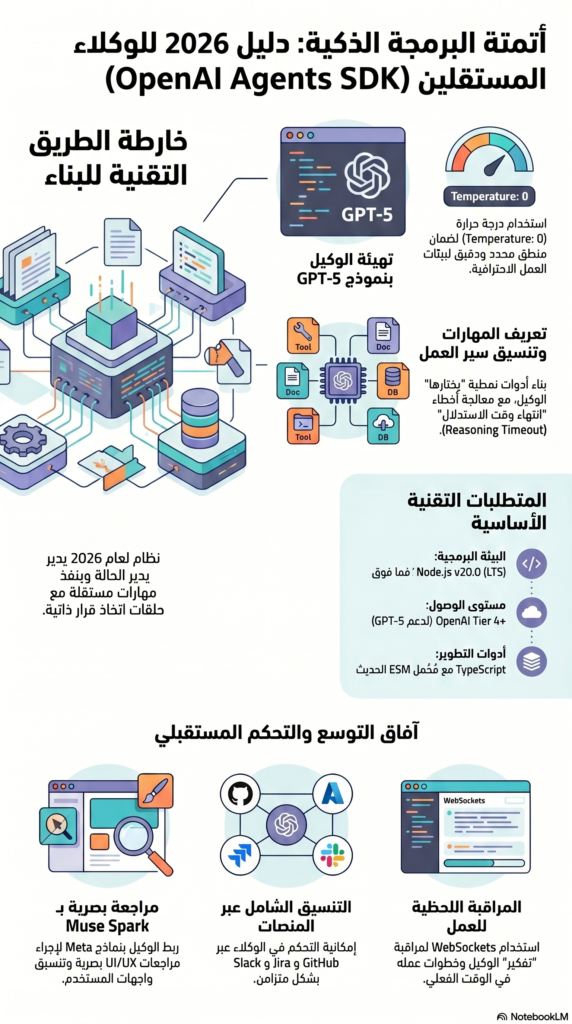
- Node.js v20.0 or higher (LTS recommended)
- OpenAI Tier 4+ API Access (for GPT-5 reasoning models)
- Advanced TypeScript knowledge and Node.js environment setup
What We’re Building
In this 2026 guide, we are moving beyond simple API calls. We will build a Multi-Skill Agentic Workflow. Unlike standard LLM implementations, this system utilizes the 2026 OpenAI Agents SDK to manage state, execute specialized “Skills,” and handle autonomous decision-making loops.
This project demonstrates how to reduce manual CI/CD intervention by allowing AI agents to conduct deep code analysis and verification checks with near-zero latency.
Setup and Installation
Ensure you are using the latest version of the SDK, which supports native 2026 reasoning models.
npm install @openai/agents-sdk@latest typescript ts-node dotenvConfigure your environment for 2026 production standards:
# .env file
OPENAI_API_KEY=your-openai-api-key
OPENAI_ORG_ID=your-org-id
Step 1: Initializing the Agent with GPT-5
We will initialize the agent using gpt-5-preview, which supports the enhanced reasoning tokens required for complex workflow orchestration.
import { Agent } from '@openai/agents-sdk';
import dotenv from 'dotenv';
dotenv.config();
const agent = new Agent({
apiKey: process.env.OPENAI_API_KEY,
model: 'gpt-5-preview', // Utilizing 2026 Frontier reasoning
temperature: 0, // Critical for consistent workflow automation
});
agent.initialize().then(() => {
console.log('Agentic Core initialized successfully');
}).catch(error => {
console.error('Core Initialization Failure:', error);
});
In this updated setup, we use temperature: 0 to ensure that the agent follows the deterministic logic required for enterprise-grade automation.
Step 2: Defining Autonomous Skills
Skills in the 2026 SDK are modular tools that the agent can “choose” to execute based on its reasoning chain.
import { Skill } from '@openai/agents-sdk';
const codeReviewSkill = new Skill({
name: 'advancedCodeReview',
description: 'Performs deep architectural analysis and security auditing.',
execute: async (context) => {
console.log('Agent is analyzing architectural patterns...');
// In a real-world scenario, you would integrate with a linter or compiler here
return {
status: 'verified',
logicCheck: true,
timestamp: new Date().toISOString()
};
}
});
agent.registerSkill(codeReviewSkill);
Step 3: Orchestrating the Agentic Workflow
Workflows now support dynamic step branching. We’ll start with a foundational sequential execution.
import { Workflow } from '@openai/agents-sdk';
const deploymentWorkflow = new Workflow({
name: 'prodDeploymentCheck',
steps: [
{
skill: codeReviewSkill,
input: { repository: 'main-branch-v5' }
}
]
});
agent.runWorkflow(deploymentWorkflow).then(result => {
console.log('Agent successfully completed workflow:', result);
}).catch(error => {
console.error('Workflow interrupted:', error);
});
runWorkflow in an async/await block inside a try-catch to handle the new “Reasoning Timeout” errors introduced in GPT-5.Testing Your Agent
node --loader ts-node/esm index.tsUsing the ESM loader ensures compatibility with the latest version of the Agents SDK. You should see the agent initialize, analyze the “codebase,” and return a verified status.
Expanding Your Agent’s Intelligence
- Muse Spark Integration: Bridge your SDK to Meta’s Muse Spark for multi-modal code review (visual UI/UX analysis).
- Real-time Dashboards: Hook the
agent.on('step')event into a WebSocket to watch your AI work in real-time. - Cross-Platform Orchestration: Use the same SDK to control agents across GitHub, Jira, and Slack.