Executive Verdict & Key Takeaways
Advanced
⏱ 40 min read
© Gate of AI 2026
Learn how to build a dual-engine AI agent in Python that intelligently routes tasks between GPT-4o and Gemini 2.5 using modern SDKs, with built-in memory and smart model selection.
Prerequisites
- Python 3.10 or higher
- OpenAI API key and Google Gemini API key
- Basic understanding of Python and API usage
What You’ll Learn
Building internal business apps or AI workflows from scratch?
Skip boilerplate schemas and CRUD setup. Generate a live PostgreSQL-backed Micro-ERP in minutes.
- How to initialize modern OpenAI and Google GenAI clients
- Intelligent task routing between GPT-4o and Gemini
- Implementing lightweight memory for context retention
- Secure API key management with environment variables
What We’re Building
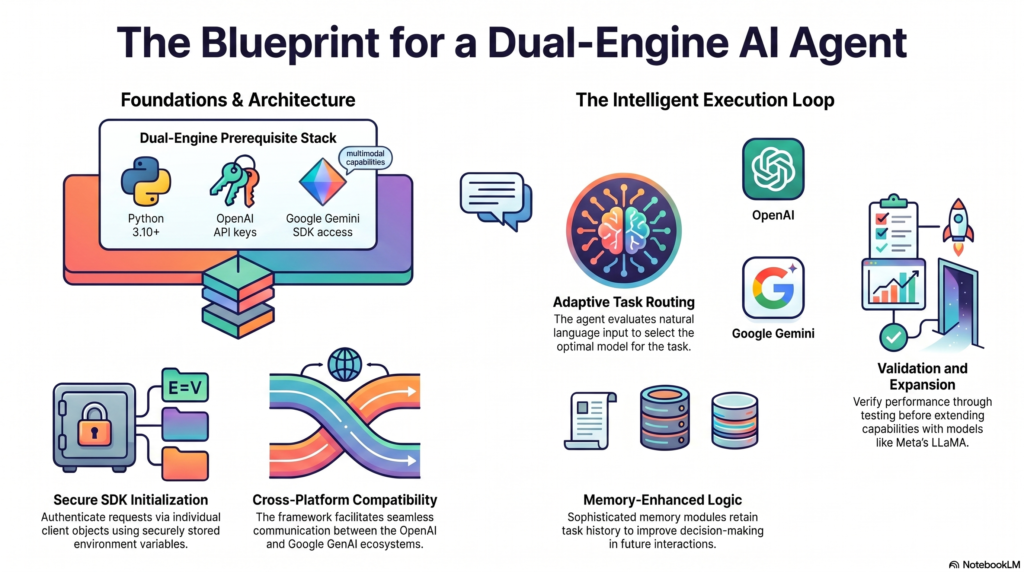
In this tutorial, we will build a dual-engine AI agent that can dynamically choose between GPT-4o and Gemini 2.5 Flash depending on the task.
The agent uses a simple but effective routing system to decide which model to use, while also maintaining memory of previous interactions. This pattern helps balance cost, speed, and output quality.
Setup and Installation
Install the required packages:
pip install openai google-genai python-dotenvCreate a .env file to store your API keys:
# .env
    OPENAI_API_KEY=sk-...
    GEMINI_API_KEY=AIza...
Step 1: Initializing the Dual-Engine Agent
We begin by setting up the agent class with both OpenAI and Google GenAI clients using the latest SDK patterns.
import os
    from dotenv import load_dotenv
    from openai import OpenAI
    from google import genai

    load_dotenv()

    class DualEngineAgent:
        def init(self):
            self.memory = []
            self.openai_client = OpenAI(api_key=os.getenv("OPENAI_API_KEY"))
            self.gemini_client = genai.Client(api_key=os.getenv("GEMINI_API_KEY"))

        def query_openai(self, prompt: str) -> str:
            response = self.openai_client.chat.completions.create(
                model="gpt-4o",
                messages=[{"role": "user", "content": prompt}],
                max_tokens=800
            )
            return response.choices[0].message.content.strip()

        def query_gemini(self, prompt: str) -> str:
            response = self.gemini_client.models.generate_content(
                model="gemini-2.5-flash",
                contents=prompt,
            )
            return response.text.strip()

    agent = DualEngineAgent()
How to Route Tasks Between GPT-4o and Gemini
Instead of a basic keyword check, we use a more practical heuristic to route tasks to the better-suited model.
def process_task(self, task_description: str) -> str:
        task_lower = task_description.lower()

        # Route complex or analytical tasks to Gemini
        if any(word in task_lower for word in ["analyze", "compare", "research", "summarize", "evaluate", "review"]):
            model_used = "gemini"
            result = self.query_gemini(task_description)
        else:
            model_used = "openai"
            result = self.query_openai(task_description)

        self.memory.append({
            "task": task_description,
            "model_used": model_used,
            "result": result
        })
        return result

    DualEngineAgent.process_task = process_task

    Example
    result = agent.process_task("Analyze the impact of AI on software development")
    print(result)
How to Add Memory to Your AI Agent
We add a simple memory mechanism so the agent can reference previous tasks and results.
def enhance_with_memory(self, context: str) -> str:
        matches = [entry for entry in self.memory if context.lower() in entry['task'].lower()]

        if matches:
            last = matches[-1]
            return f"Based on previous task ({last['model_used']}):\n\n{last['result']}"
        return "No relevant memory found."

    DualEngineAgent.enhance_with_memory = enhance_with_memory

    Example usage
    agent.process_task("Review Q2 marketing performance")
print(agent.enhance_with_memory("marketing"))Always restart your terminal or code editor after modifying the
.env file. This is one of the most common reasons why API keys fail to load.Testing the Agent
# Test individual models
    print(agent.query_openai("Explain RAG in simple terms"))
    print(agent.query_gemini("Compare Claude and Gemini for coding"))

    Test full pipeline with memory
    agent.process_task("Summarize recent AI agent trends")
    print(agent.enhance_with_memory("trends"))
What to Build Next
- Upgrade the router to use an LLM for dynamic model selection
- Implement full conversation history instead of simple task memory
- Add support for more models (Claude 4, Llama 4, etc.)
- Build a CLI or simple web interface for the agent